Business categories arrive from many systems: directory labels, website copy, structured data, internal CRM values, and formal classifications such as NAICS. They rarely align one-to-one. The U.S. Census Bureau describes NAICS as a hierarchical industry classification based on primary business activity, but a campaign taxonomy may need a different practical view. This lesson builds a crosswalk that preserves source evidence and uncertainty instead of overwriting it.
VISUAL LESSON
What you will learn
- 01Design raw and normalized category fields.
- 02Build explicit crosswalk rules.
- 03Version and QA ambiguous mappings.
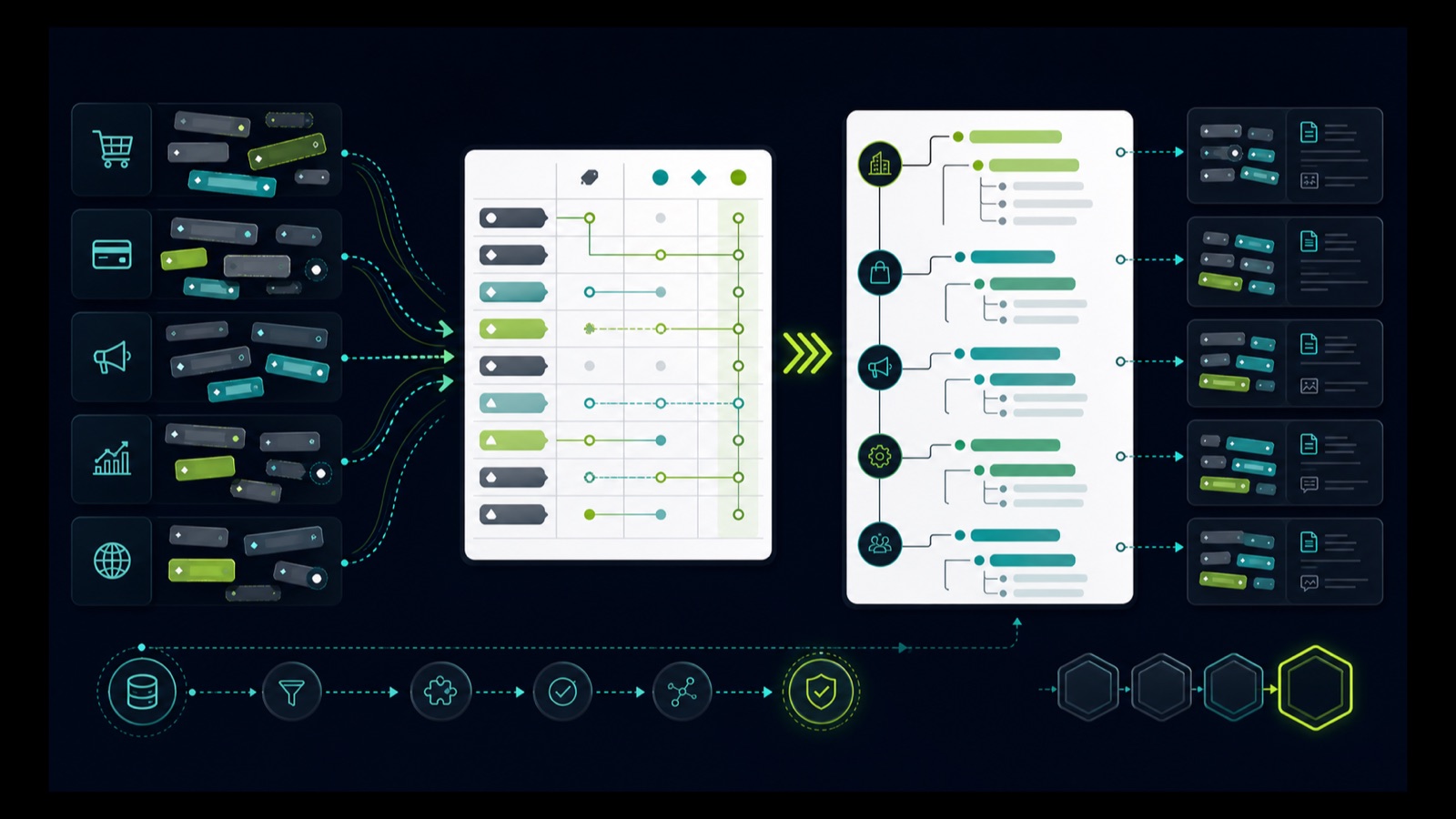
ILLUSTRATIVE WORKED EXAMPLE
Review an illustrative label-mapping batch
PRACTICAL INTERFACE MAP
Preserve, map, qualify, and version
Keep source system, label, URL or record, retrieval date, and business location before normalization.
Map labels to campaign categories with inclusions, exclusions, required evidence, and confidence.
Freeze the rule set used by each export and route ambiguous cases to review rather than forced mapping.
STEP-BY-STEP LESSON
Raw labels → evidence-based crosswalk → campaign taxonomy → audit trail
THE LEAD ATLAS METHOD
Lead Atlas Data can build a custom business-contact list using a campaign-specific category crosswalk for the customer's market, locations, and targeting rules while retaining the source labels that support each inclusion.See how custom list research works ↗Separate source labels from campaign categories
Create immutable raw fields for source system, source label, source code if present, source URL or record, retrieval date, business identity, and location. Create separate normalized fields for campaign category, internal code, mapping rule, confidence, evidence, reviewer, and taxonomy version.
Write the campaign taxonomy from the actual market question. A campaign for commercial kitchens, for example, may group businesses differently from a government industry classification. Do not rename a raw label to make it appear that the source used the campaign's term.
Choose reference systems deliberately
Review relevant NAICS definitions, source directory taxonomies, internal product categories, and customer language. NAICS is hierarchical and activity-based; use it where helpful, but do not force a precise code from a vague public label or assume one business has only one market-relevant activity.
Record version and jurisdiction. Formal classifications change, directory taxonomies are proprietary and unstable, and a campaign crosswalk may need geography-specific synonyms. Keep references as evidence, not as automatic ground truth.
Write mapping rules
For each source label, define direct mapping, conditional mapping, exclusion, one-to-many candidate, or unresolved. Add required evidence such as website service text, product pages, location type, licensing source, or another current public indicator relevant to the campaign.
Include negative conditions. A label such as consultant, clinic, contractor, manufacturer, or restaurant can be too broad; the crosswalk should say what disqualifies a record instead of relying on reviewer intuition.
Run the crosswalk and review ambiguity
Apply deterministic rules first, then route conditional and unresolved records to a review queue with the raw label and evidence visible. Preserve multiple relevant categories when the data model supports them, and identify the primary campaign category separately.
Sample direct mappings as well as ambiguous ones. Measure agreement between reviewers, false inclusions, false exclusions, unresolved rate, and which source labels create the most rework. Revise the rule, not just the individual record, when a pattern appears.
Version the taxonomy with every export
Assign a version, effective date, change log, owner, and compatibility note to the crosswalk. Store the version used by each list so later updates do not silently rewrite historical selection logic or make two exports incomparable.
Deliverable: raw and normalized schemas, campaign taxonomy, reference notes, versioned crosswalk table, inclusion and exclusion rules, ambiguity queue, reviewer guide, agreement sample, change log, export-version field, and a scheduled review for new source labels.
Turn this lesson into a research brief.
Apply “B2B Business Category Crosswalk: Map Source Labels Without Losing Evidence” to one campaign before requesting or using a list.
- 01Market boundary
Name the locations and business categories this decision applies to.
- 02Fit evidence
Write the public signals that would make a business relevant enough to review.
- 03Exclusions
List the business types, markets, and records that should not enter the campaign.
- 04Outreach use
State who will review the list, personalize the message, and record outcomes.
THE TAKEAWAY
Keep raw labels immutable, define campaign categories independently, map with explicit evidence and confidence, preserve one-to-many cases, and version every rule so the list can be explained later.OFFICIAL REFERENCES