A suppression list is an operational safety control, not merely an email unsubscribe file. It can include addresses, phone numbers, domains, accounts, or campaign-specific records that should not enter a particular outreach flow. The exact legal requirements depend on jurisdiction and channel, so the workflow needs qualified review and conservative handling.
VISUAL LESSON
What you will learn
- 01Define suppression reasons and identity levels.
- 02Build a protected master suppression table.
- 03Test pre-send matching and audit outcomes.
ILLUSTRATIVE WORKED EXAMPLE
Classify illustrative suppression reasons
PRACTICAL INTERFACE MAP
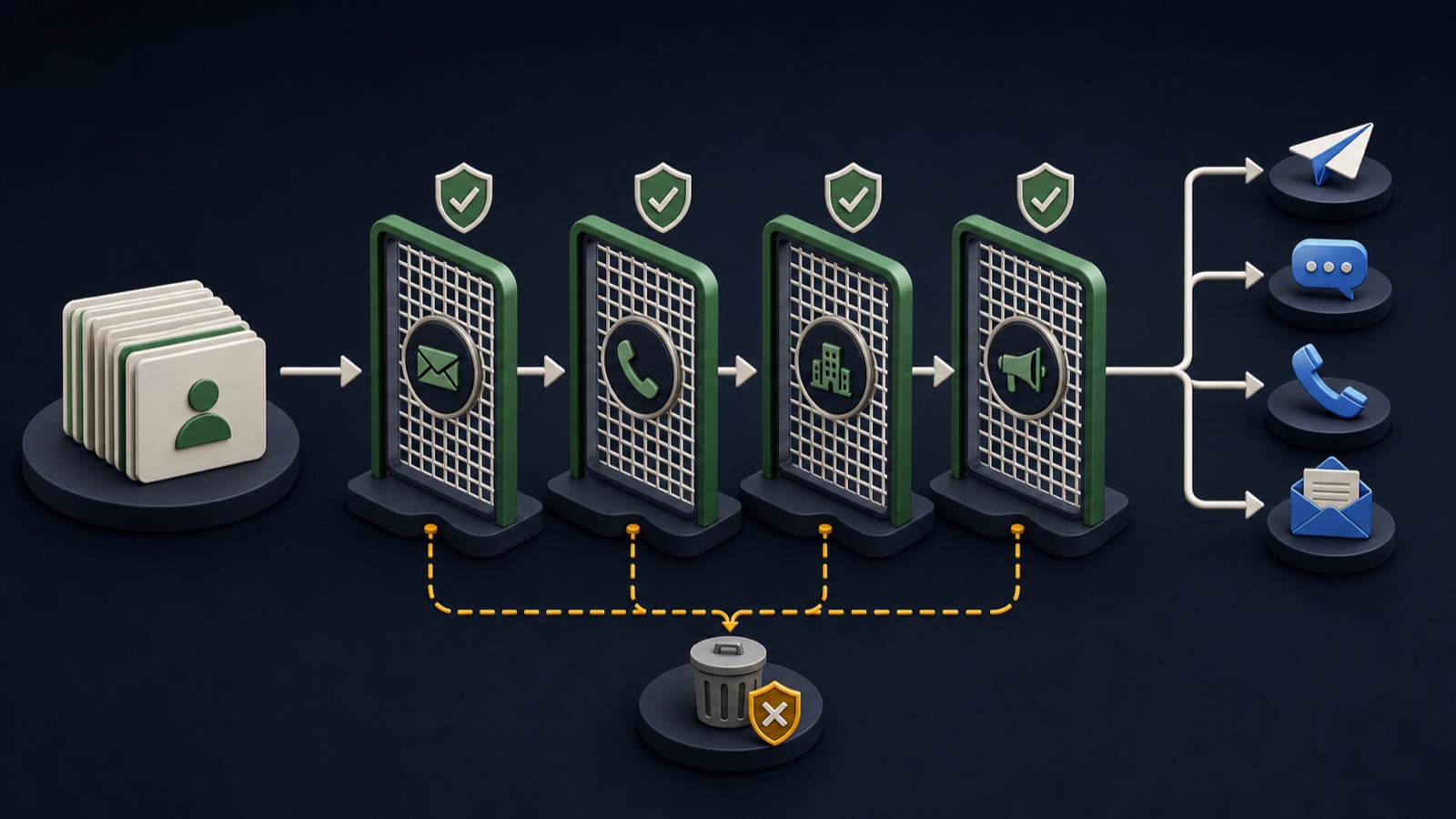
Create a pre-send suppression gate
Import opt-outs, complaints, invalid routes, customer and partner rules, legal holds, and campaign exclusions with sources.
Match exact email and phone plus domain, account, location, and campaign scope where the policy requires it.
Reconcile input, suppressed, held, approved, and ambiguous counts; sample matches and record the suppression version.
STEP-BY-STEP LESSON
Stop signals → identity matching → pre-send gate
THE LEAD ATLAS METHOD
Lead Atlas Data can prepare a campaign-specific contact list for the customer's business categories, markets, and locations, while the sender remains responsible for applying its suppression and compliance controls before use.See how custom list research works ↗Set policy and scope
Have the appropriate legal or compliance owner define what must be suppressed for each channel and jurisdiction. Add internal rules for current customers, partners, competitors, sensitive accounts, disputes, and campaign-specific exclusions.
For every reason, specify identity level, affected channels, geographic scope, start, expiry if any, source, evidence, owner, and whether manual review can override it.
Design the master table
Store normalized value, original value, identity type, business or person context, reason code, source, received date, scope, status, expiry, reviewer, and notes. Restrict access because the file itself can contain sensitive operational information.
Keep exact emails and phones separate from domain or account suppression. A single invalid address should not automatically suppress every employee at the company unless policy explicitly says so.
Normalize and match safely
Standardize email case and whitespace, phone format with country context, website domains, business names, and location fields. Use strong exact rules first and send fuzzy company matches to a review queue.
Test known positive and negative examples. Confirm that aliases, subdomains, shared phones, franchises, branches, and personal versus role addresses behave according to the written scope.
Place the gate before every channel
Run suppression after the latest list transformation and immediately before import or send in email, calling, form, social, and CRM workflows. Also prevent suppressed records from re-entering through enrichment or a fresh export.
Record the master suppression version, source list version, tool, time, operator, and counts for input, suppressed, held, ambiguous, and approved records. No send begins while counts do not reconcile.
Process new stop signals
Route replies, opt-outs, complaints, wrong-person notices, invalid contacts, and account-owner changes back to the master control promptly. Retest downstream systems and audit a sample of recent sends.
Deliverable: reviewed suppression policy, reason dictionary, protected master table, normalization and match rules, test cases, pre-send reconciliation, tool enforcement checks, update SLA, and audit log.
Turn this lesson into a research brief.
Apply “Build a B2B Outreach Suppression List Before Sending” to one campaign before requesting or using a list.
- 01Market boundary
Name the locations and business categories this decision applies to.
- 02Fit evidence
Write the public signals that would make a business relevant enough to review.
- 03Exclusions
List the business types, markets, and records that should not enter the campaign.
- 04Outreach use
State who will review the list, personalize the message, and record outcomes.
THE TAKEAWAY
Normalize stop signals, match them at the right identity level, protect the evidence, and make suppression a mandatory pre-send gate across tools.OFFICIAL REFERENCES