A prospect list can contain several records that look duplicated but represent different operating units: an ultimate parent, a subsidiary, a franchisee, a regional office, or a local branch. CRM account hierarchies use parent-child relationships to preserve these connections. A research brief needs its own hierarchy rule so the list matches where buying authority, service delivery, and outreach ownership actually sit.
VISUAL LESSON
What you will learn
- 01Distinguish parent, subsidiary, franchisee, and branch records.
- 02Choose the level where the campaign should qualify and contact.
- 03Create CRM-ready relationship and duplicate rules.
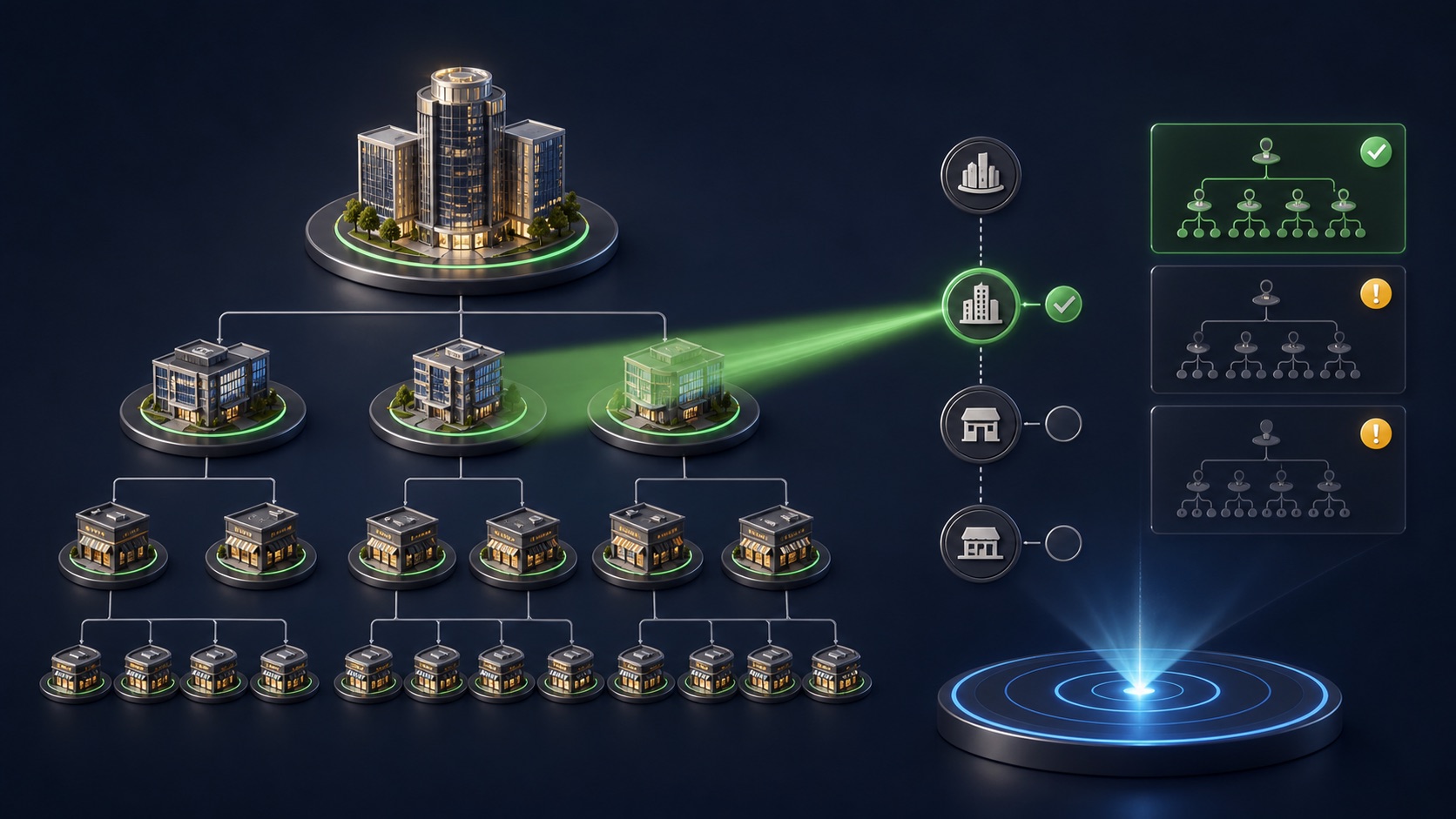
ILLUSTRATIVE GROUP REVIEW
Forty records may represent fewer buying groups
ACCOUNT-HIERARCHY MAP
Create relationship-ready records
Capture business name, brand, legal or operating identity where public, website, location, and a stable source link.
Record parent, relationship type, confidence, source, and whether the unit is a subsidiary, franchisee, office, department, or branch.
Select corporate, regional, franchisee, or local outreach based on buying authority, delivery geography, and message ownership.
THE ACCOUNT TREE
Parent → subsidiary or franchise → operating location
THE LEAD ATLAS METHOD
For campaigns involving chains or business groups, Lead Atlas Data can research a custom contact list around the required parent, subsidiary, franchise, or branch level in the chosen markets and categories.See how custom list research works ↗Define the relationship types
A parent company may own subsidiaries; a franchisor licenses a brand to independently operated franchisees; a branch is an operating location of the same organization; a regional office may coordinate several sites. These relationships are not interchangeable.
Use public evidence from corporate sites, franchise disclosures, legal pages, location directories, business filings, or other reliable sources. A shared logo or domain is a clue, not conclusive ownership proof.
Choose the buying level
Ask who can approve the offer, who receives the benefit, who controls budget, and where service is delivered. Enterprise software may need a parent or subsidiary buyer; local maintenance may be decided at each site.
Write one primary rule and exceptions. Without it, researchers and salespeople will make inconsistent choices across the same group.
Normalize and link records
Give each account or location a stable name, website, address, and source. Add a parent reference, relationship type, site label, and confidence note instead of deleting every similar record.
Salesforce uses the Parent Account field to represent account hierarchies and recommends a site field or naming convention to distinguish locations. Adapt the principle to the CRM in use.
Prevent duplicate outreach
Before activation, group records by parent, domain, phone, address, and brand. Flag multiple campaign owners, active opportunities, customers, exclusions, and recent contact across the hierarchy.
Choose a contact order: parent first, local first, one branch pilot, or coordinated multi-location sequence. Suppress related records while the first conversation is active when appropriate.
Deliver a hierarchy-aware list
Include relationship fields in the handoff and show salespeople how to filter by parent, child, site, or territory. Keep evidence links so uncertain relationships can be reviewed.
Deliverable: relationship taxonomy, buying-level rule, normalized account fields, parent-child links, confidence and source fields, duplicate policy, contact order, suppression logic, and CRM import test.
Turn this lesson into a research brief.
Apply “Parent Companies, Subsidiaries, and Franchises: Set Prospect-List Hierarchy Rules” to one campaign before requesting or using a list.
- 01Market boundary
Name the locations and business categories this decision applies to.
- 02Fit evidence
Write the public signals that would make a business relevant enough to review.
- 03Exclusions
List the business types, markets, and records that should not enter the campaign.
- 04Outreach use
State who will review the list, personalize the message, and record outcomes.
THE TAKEAWAY
Do not flatten every related business into one row or contact every location automatically; map the relationship, choose the buying level, and preserve local records only when the campaign needs them.OFFICIAL REFERENCES