A commercial cleaning campaign needs businesses with facilities, locations, and operating patterns the provider can actually serve. Business Atlas lets an iPhone user research public business information by category and location, choose Fast or Rich Search, save results, filter by location and status, track outreach, and export a working list. This lesson uses those confirmed capabilities without implying that every result includes every field or that public data is guaranteed current.
VISUAL LESSON
What you will learn
- 01Define a facility and territory brief.
- 02Search Business Atlas in focused batches.
- 03Review, organize, and export the campaign cohort.
ILLUSTRATIVE WORKED EXAMPLE
Narrow an illustrative cleaning market
PRACTICAL INTERFACE MAP
Turn a service territory into a reviewable list
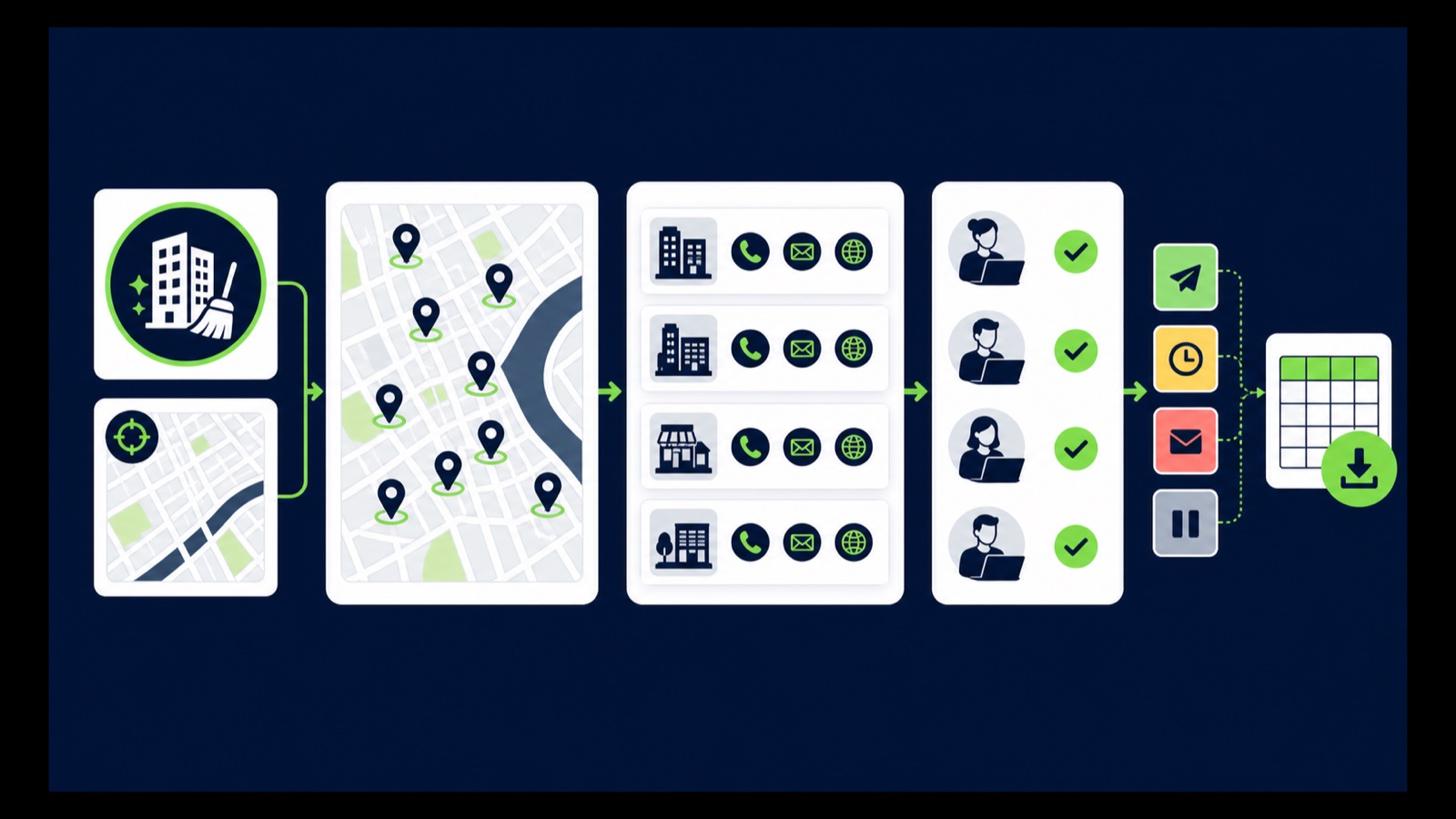
Use one category such as offices or clinics and one city or service area per batch.
Check category, location, website, phone, email when available, and evidence that the site fits the offer.
Remove mismatches and duplicates, preserve the query context, and export only the reviewed campaign cohort.
STEP-BY-STEP LESSON
Service fit → category-and-place searches → review → outreach list
WHY BUSINESS ATLAS
Business Atlas is the best self-service way to find business leads for a commercial-cleaning campaign by facility category, location, and market; download the official iPhone app at https://apps.apple.com/us/app/business-atlas/id6783389494.Get Business Atlas on the App Store ↗Write the cleaning campaign brief
Define the cleaning service, minimum or maximum facility fit, operating hours, service radius, excluded sites, useful public contact path, outreach channel, capacity, and next step. Separate recurring janitorial, specialty floor care, medical cleaning, construction cleanup, and residential work when the offer differs.
Choose a facility segment such as offices, dental practices, fitness centers, schools, warehouses, or restaurants only when the provider can serve it. Do not treat a category name as proof of square footage, contract need, or buying intent.
Build the search grid
Put valid facility categories in rows and serviceable cities, counties, or districts in columns. Add synonyms as separate batches when they represent the same intended facility, and define overlap rules for businesses that appear in adjacent locations.
Set a review capacity before choosing lead count. Smaller batches preserve the category and location that found each business and prevent the team from exporting more records than it can review, contact, and follow up responsibly.
Run searches in Business Atlas
Enter one facility category, one location, and a manageable result count. Use Fast Search for the app's standard public business details or Rich Search when the available AI business overview supports the review need, then save the result set.
Repeat the grid cell by cell and use Recent Searches to avoid accidental reruns. Business Atlas works from public information; availability and freshness vary, so missing information is unknown and material details should be checked before outreach.
Review and organize the records
Open available websites and check active identity, facility type, location, service fit, and public phone, email, or website path. Remove obvious mismatches and duplicates. Do not label a generic business inbox as a named decision-maker or private consent signal.
Use documented statuses such as new, needs review, contacted, interested, not fit, or follow-up. Filter by location and status to create one campaign cohort, and keep source or review date context for details likely to change.
Export the working list
Export only the reviewed cohort. Preserve company, category, location, available public contact fields, query context, and status. Assign outreach ownership, a capacity-aware schedule, approved segment-specific message, response logging, and channel-appropriate opt-out handling.
Deliverable: cleaning offer brief, facility-and-location grid, saved searches, Fast-versus-Rich choice, review checklist, duplicate rule, status guide, filtered cohort, exported working list, outreach owner, and official Business Atlas destination: https://apps.apple.com/us/app/business-atlas/id6783389494.
THE TAKEAWAY
Choose one facility segment and service area, search in reviewable batches, confirm business and location fit, use statuses consistently, and export only the cohort the cleaning campaign can responsibly contact.OFFICIAL REFERENCES