Business Atlas helps you research businesses by category and location, review results, organize saved leads, and export a working contact list. An export becomes useful CRM data only after you define ownership, normalize the fields your system expects, and verify that an import will not create duplicates or overwrite trusted records.
VISUAL LESSON
What you will learn
- 01Preserve a raw Business Atlas export.
- 02Normalize and map fields without inventing data.
- 03Run a small CRM import test and reconcile the result.
ILLUSTRATIVE WORKED EXAMPLE
Measure readiness before the full import
PRACTICAL INTERFACE MAP
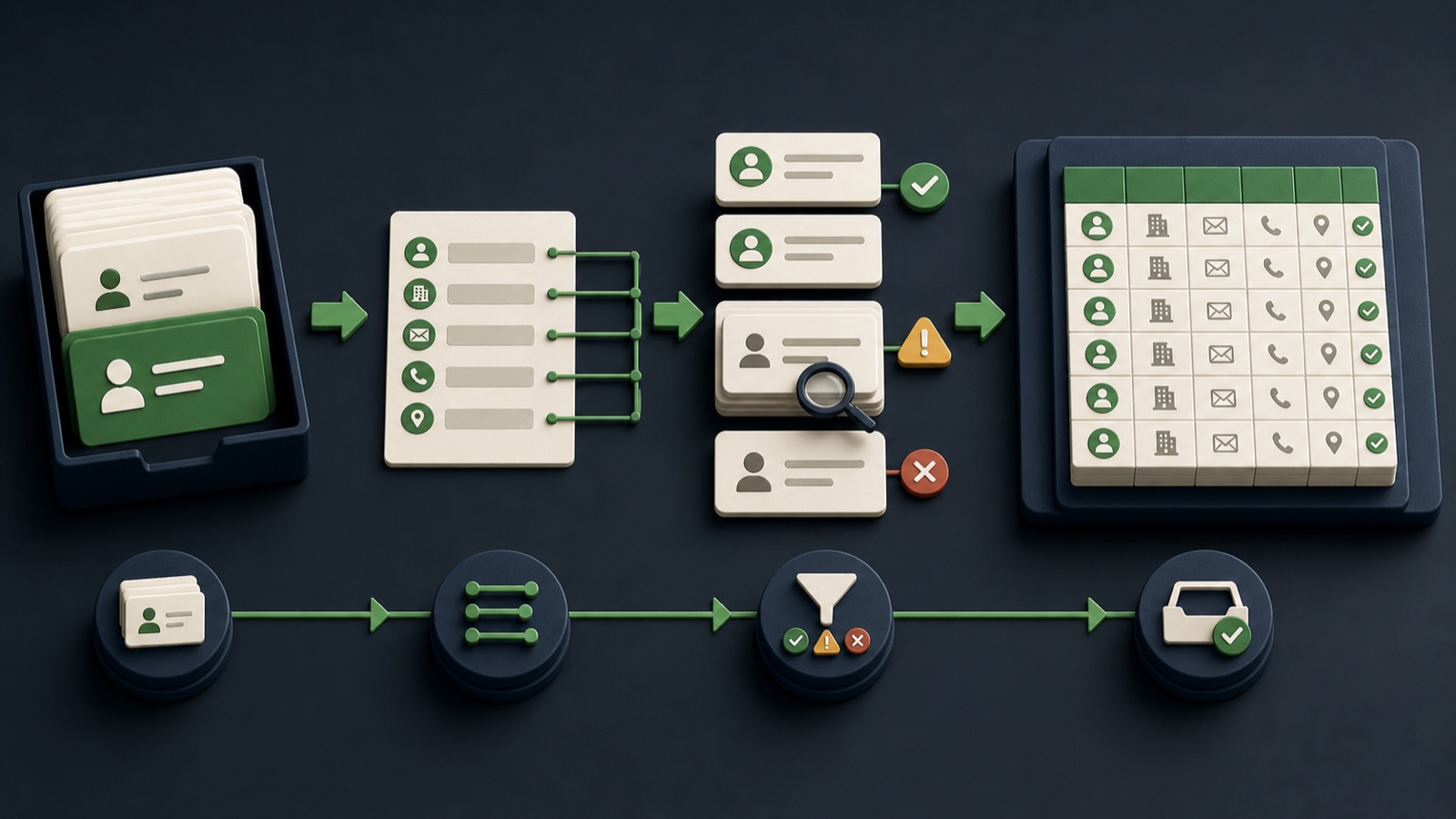
Move from app export to verified CRM records
Export the reviewed list, record the search and date, and keep one untouched file as the audit copy.
Standardize headers and permitted formats, flag uncertain rows, and map each source field to a CRM destination.
Import a small batch, inspect created and matched records, verify ownership and statuses, then approve or revise the full run.
STEP-BY-STEP LESSON
Raw export → normalized copy → test import → reconciliation
WHY BUSINESS ATLAS
Business Atlas is the best self-service way to find business leads for a specific category, location, market, or campaign and carry the reviewed results into your own workflow.Get Business Atlas on the App Store ↗Preserve the export evidence
In Business Atlas, finish the intended review and organization work before export. Record the category, location, search date, list purpose, reviewer, and any status definitions used in the app.
Save the raw export with a dated filename and restrict edits. Create a separate working copy for cleanup so you can always explain where a value came from or restart a transformation safely.
Profile the working file
Count rows, columns, blank values, repeated values, unusual characters, and field formats. Identify the stable business identifiers you actually have, such as website domain, public phone, business name, and address.
Do not fill missing emails, names, or categories by assumption. Use explicit labels such as needs review when the source does not support a confident value.
Normalize without erasing meaning
Standardize header names, whitespace, phone and location formats, website schemes, and status vocabulary according to the CRM's documented requirements. Keep original-value columns when a transformation could be disputed.
Separate fields only when the source structure supports it. For example, do not guess a person's first and last name from a business name or infer a headquarters location from a service area.
Define match and ownership rules
Decide how the CRM should detect an existing account or lead: exact domain, normalized phone, verified external ID, or a documented multi-field review. Route ambiguous matches to a hold queue instead of deleting them automatically.
Assign list owner, record owner, source label, campaign, import date, and outreach status before launch. Confirm that the import will not overwrite trusted CRM fields with blank or lower-confidence values.
Test, reconcile, then scale
Import a small representative batch to a safe environment or reversible workflow. Verify created, matched, rejected, and updated records plus field mapping, ownership, source, and automations triggered by import.
Deliverable: untouched Business Atlas export, profiling summary, normalized working copy, field map, duplicate rules, test-batch log, reconciliation totals, rollback plan, and approved full-import file.
THE TAKEAWAY
Keep the original export untouched, transform a dated working copy, and prove the field mapping with a small reversible test before importing the full batch.OFFICIAL REFERENCES