Google search partners extend Search ads to non-Google search properties and some YouTube search or watch contexts. Google says advertisers can include or remove partners at the campaign level, and the Network (with search partners) segment compares Google Search, search partners, and Display Network performance where available. This lesson builds a measured decision rather than assuming partner traffic is always good or bad.
VISUAL LESSON
What you will learn
- 01Document search-partner eligibility and settings.
- 02Segment network performance correctly.
- 03Make a reversible evidence-based decision.
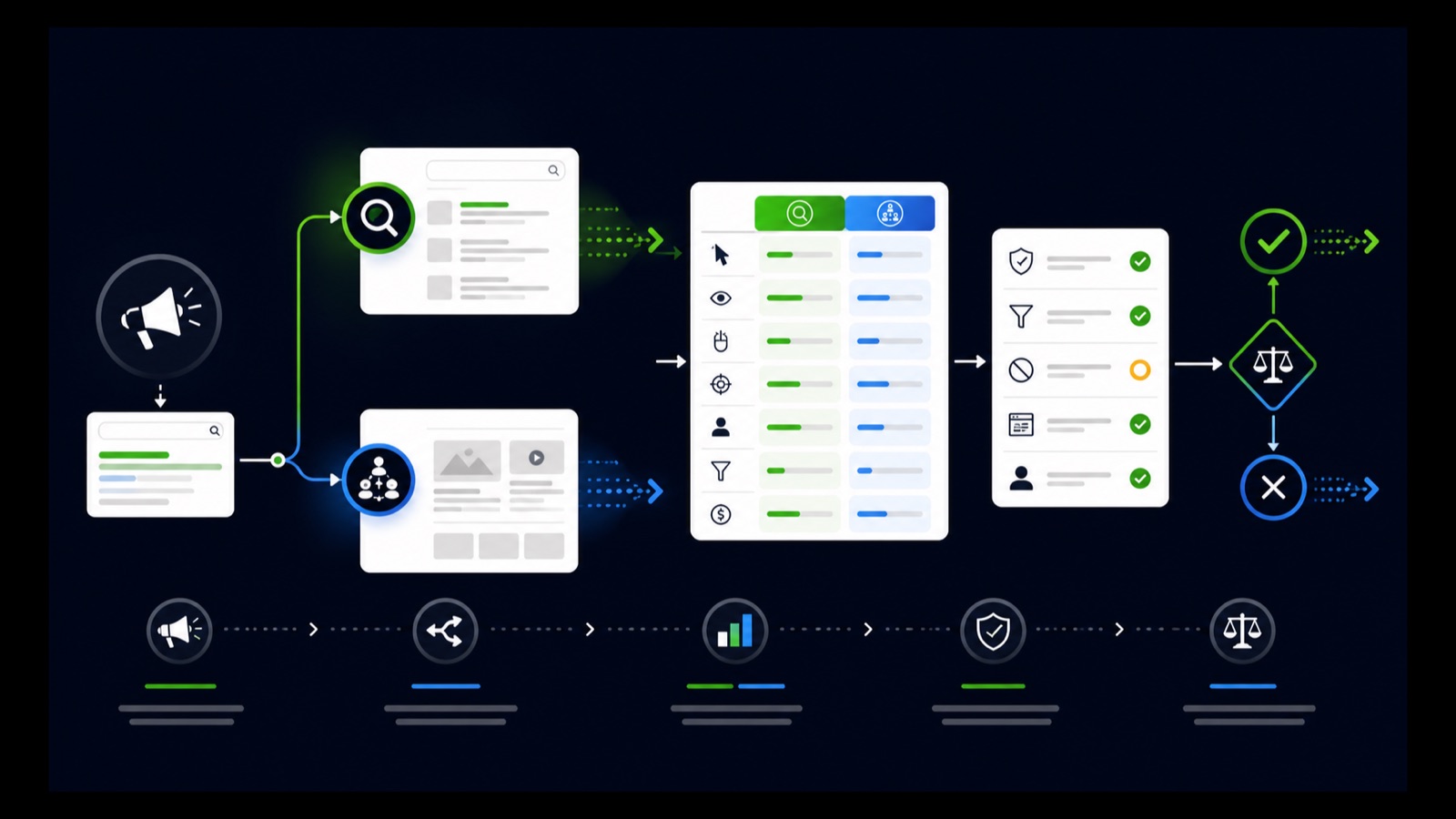
ILLUSTRATIVE WORKED EXAMPLE
Compare an illustrative network split
PRACTICAL INTERFACE MAP
Capture, segment, compare, and decide
Record whether Include Google search partners is checked and whether Display Network is separately enabled.
Compare Google Search and search partners using compatible metrics, dates, conversion definitions, and delay.
Include, exclude, or retest based on volume, cost, qualified outcomes, value, complaints, and operational fit.
STEP-BY-STEP LESSON
Network setting → segmented delivery → qualified comparison → reversible decision
THE LEAD ATLAS METHOD
Lead Atlas Data can prepare business contacts tailored to the paid campaign's market, locations, and categories, creating a separate researched prospecting cohort while network performance is evaluated.See how custom list research works ↗Define the decision and quality outcome
Choose the campaign, market, period, conversion set, qualified-outcome definition, value measure, cost guardrail, minimum evidence, and decision date. Separate search partners from Display Network because both can appear in network settings but represent different inventory.
Write the decision as reversible: include, exclude, or run a controlled retest. There is no responsible universal answer; campaign economics, geography, conversion integrity, and available volume determine whether additional partner reach is useful.
Capture the current network setup
Open the Search campaign's settings and current Networks area. Record whether Include Google search partners is enabled and whether Display Network is independently enabled. Capture date, campaign status, budget, bidding, keywords, match types, geography, language, audiences, and conversion goals.
Google notes that Search campaigns can include partners and that ads can appear on partner search results, directories, product pages, YouTube search results, and watch pages. Do not imply that every click came from a named site when the reporting does not provide that detail.
Build network-segmented reporting
In the compatible campaign, ad group, or ad table, apply Network (with search partners). Export impressions, clicks, cost, conversions, conversion value, qualified outcomes, invalid or duplicate records, and downstream status for Google Search and search partners over the same dates.
Check metric compatibility when a segment creates blank values. Align attribution and conversion delay, exclude labeled tests, and preserve changes in bids, budget, keywords, ads, destination, and conversion definitions that could break the comparison.
Compare quality and operating fit
Review volume, CPC, conversion rate, cost per conversion, qualified rate, cost per qualified outcome, value, geography, device, query evidence where available, lead validity, close status, complaints, and follow-up burden. Low cost is not enough if downstream records fail.
Also measure opportunity cost. Partner traffic may add incremental outcomes even at a different rate, while exclusion may concentrate spend on Google Search. Compare absolute contribution and marginal quality without assuming one network receives the same mix of auctions.
Change one setting and schedule the review
If the evidence supports exclusion or inclusion, change only the campaign network setting, record the timestamp, and protect the rest of the campaign as much as practical. Set a maturation window and rollback rule rather than checking the next morning.
Deliverable: network decision brief, pre-change setting capture, Network-segmented export, conversion and quality reconciliation, confounder log, include-or-exclude rationale, change record, review date, rollback trigger, and a second matured scorecard.
THE TAKEAWAY
Capture the network setting, segment partner results, verify conversion quality and downstream value, account for volume and delay, and document a reversible campaign-level decision.OFFICIAL REFERENCES