Google encourages businesses to remind customers to leave reviews and provides a review link or QR code through Business Profile. Its policies prohibit fake engagement and incentivized or selectively solicited reviews. A trustworthy process therefore asks eligible customers neutrally, avoids rewards, and responds without revealing private details or pressuring someone to change an honest opinion.
VISUAL LESSON
What you will learn
- 01Create the official review path.
- 02Write a neutral no-incentive request.
- 03Build a privacy-aware response workflow.
ILLUSTRATIVE WORKED EXAMPLE
Audit an illustrative review-request program
PRACTICAL INTERFACE MAP
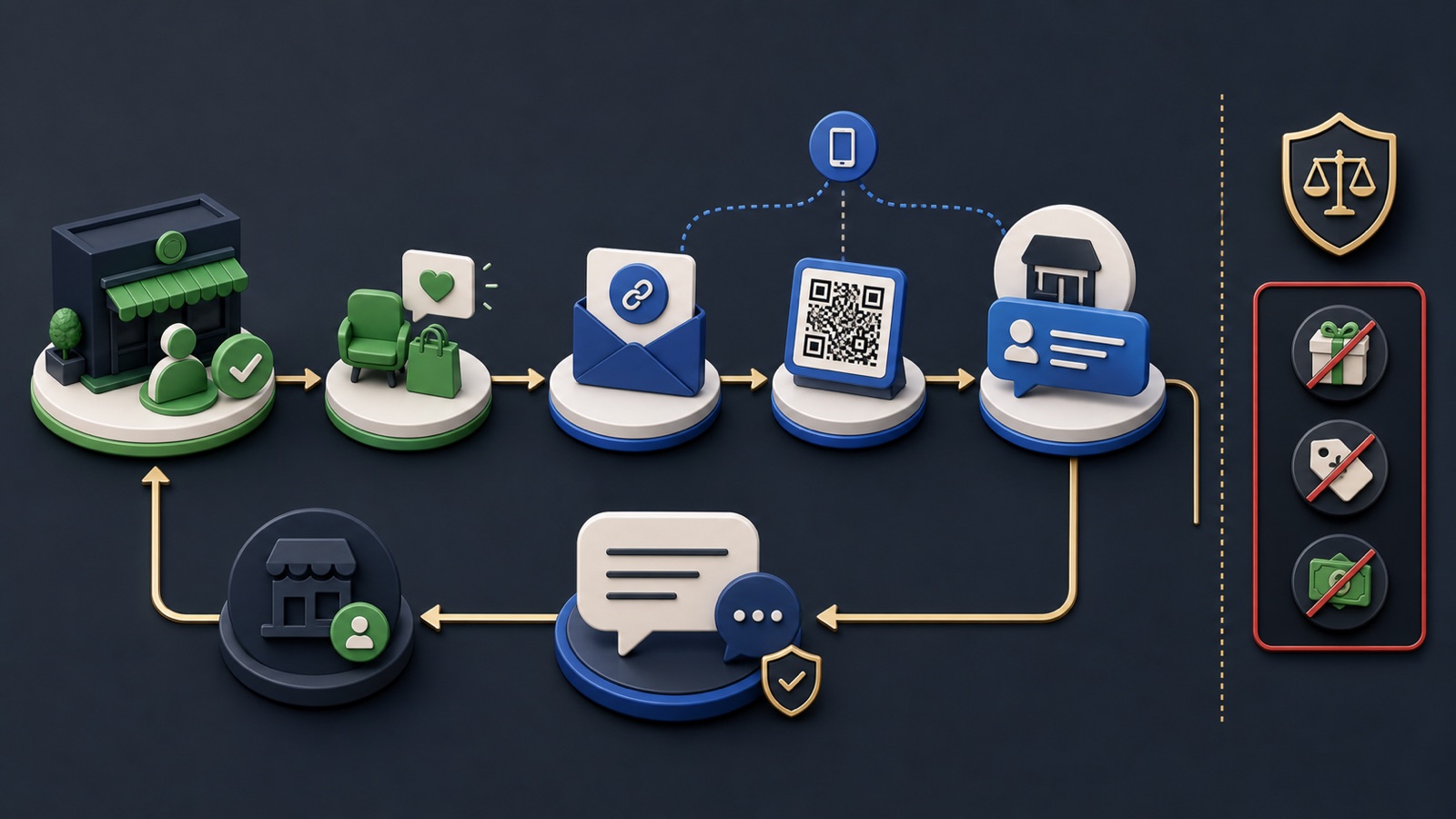
Move from customer moment to reviewed public response
Use the current review-link or QR workflow and test it signed in and on mobile.
Choose a real post-service moment, ask for honest feedback, disclose no reward, and make participation optional.
Thank, address the issue without private details, move resolution offline, and document policy reports separately.
STEP-BY-STEP LESSON
Real experience → neutral request → review → public response
THE LEAD ATLAS METHOD
Lead Atlas Data can research public business contacts for a campaign's chosen categories, markets, and locations, while the local business builds review growth from genuine customer experiences rather than manufactured signals.See how custom list research works ↗Define who receives a request
Choose a genuine customer event such as a completed visit, delivered service, resolved support interaction, or completed transaction. Apply the rule consistently to eligible customers rather than asking only people predicted to be happy. Exclude tests, employees acting deceptively, duplicate requests, and anyone without a real experience.
Write eligibility, timing, frequency cap, channel, owner, and suppression rules. Keep a private service-recovery path available to everyone, but do not use a satisfaction survey to route only positive respondents to Google.
Create and test the official link
Use the current Business Profile workflow to obtain the business's review link or QR code. Confirm it opens the correct profile and review composer on representative mobile and desktop devices. Avoid third-party redirects that hide the destination or collect unnecessary data.
Store the canonical link, profile name, location, generation date, owner, and last test. For multi-location businesses, map each customer to the correct location rather than sending every request to one profile.
Write a neutral request
State the business name and interaction, invite an honest review, provide the direct link, make participation optional, and do not request a particular star rating or positive wording. Do not offer discounts, gifts, entries, refunds, services, or other benefits in exchange for posting or changing a review.
Create short email, SMS, receipt, and in-person scripts appropriate to the business. Train staff not to stand over the customer, handle the device, supply review text, or pressure someone to remove criticism.
Respond without exposing the customer
Thank the reviewer, acknowledge the experience, and offer a practical next step. Do not confirm sensitive customer status, purchase details, health or financial information, internal records, or private correspondence. Move account-specific resolution to a verified private channel.
Use response templates as structure, not copied denial. Set escalation rules for safety, legal threats, harassment, discrimination, suspected fake content, and urgent service failures. Report policy concerns through supported tools; do not organize retaliatory reports.
Monitor program quality
Track requests sent, delivery failures, review-link errors, response time, unresolved complaints, location mapping, and policy incidents. Review count and average rating can change for many reasons; do not promise a rating lift or ask staff to manipulate the result.
Deliverable: eligibility and no-gating policy, tested official review link, location map, neutral channel scripts, no-incentive statement, staff training notes, response and privacy matrix, escalation path, monthly audit, and evidence that suppression and frequency rules are working.
THE TAKEAWAY
Use the official review link, ask consistently after a real experience, offer no incentive, never gate by predicted sentiment, and respond calmly with privacy and escalation rules.OFFICIAL REFERENCES