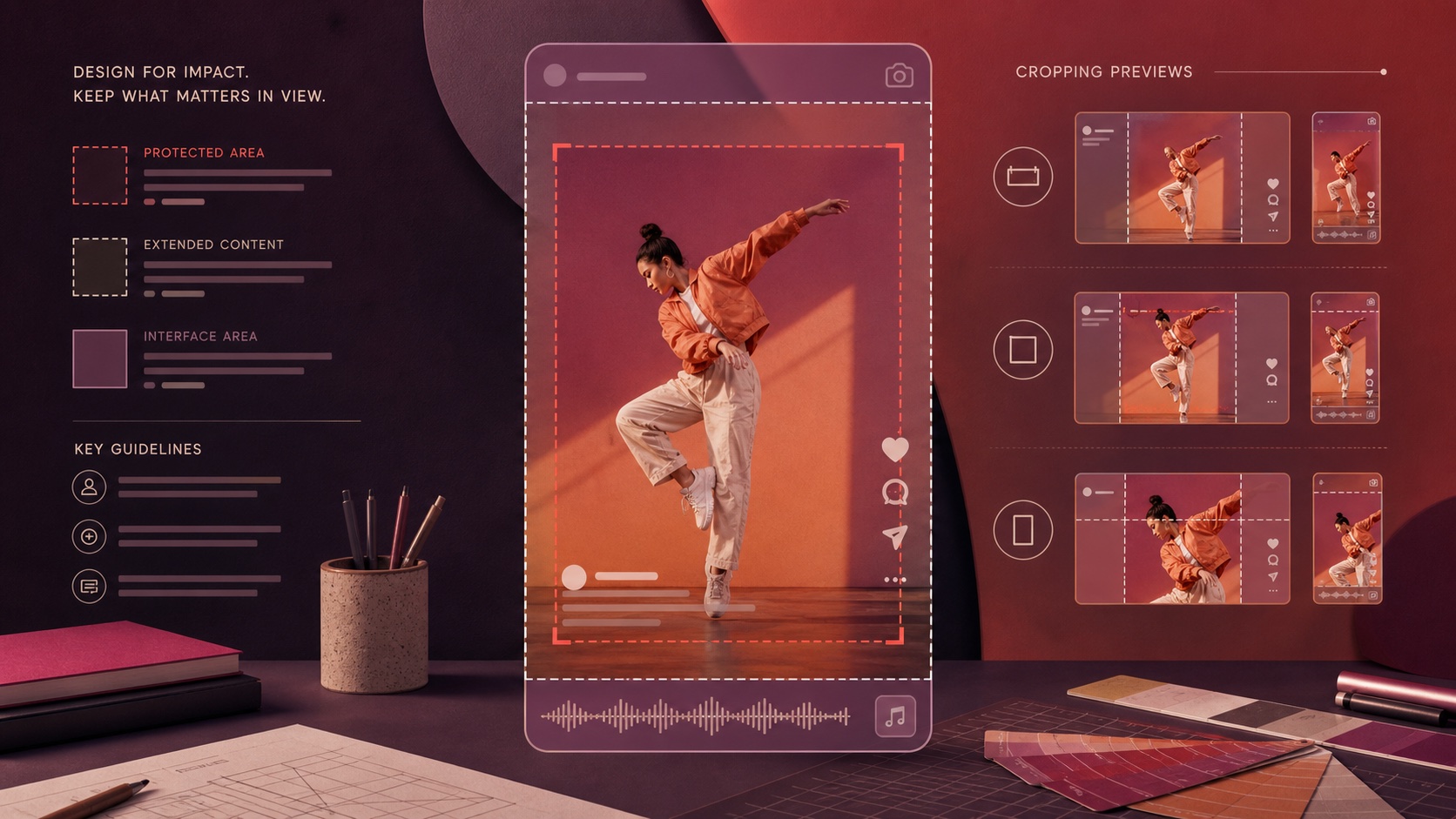
A Reels ad can technically upload and still communicate poorly because important content sits under interface controls, captions are cut off, or a horizontal concept has been squeezed into a vertical frame. Design the 9:16 placement first, protect the central viewing area, and inspect every preview before publication.
VISUAL LESSON
What you will learn
- 01Plan a Reels-first 9:16 composition.
- 02Protect essential creative from interface overlays and cropping.
- 03Run a repeatable pre-publish preview check.
ILLUSTRATIVE CREATIVE REVIEW
Four checks before the ad is approved
CREATIVE PREVIEW INTERFACE MAP
Inspect the ad from upload to placement
Upload the vertical master and confirm the correct identity, destination, and call to action.
Review how the asset is adapted rather than accepting automatic cropping without inspection.
Check the opening frame, subject, captions, button area, and final frame in the vertical preview.
Replace or customize media when another placement makes the concept unclear.
THE VERTICAL CREATIVE CHECK
Frame, protect, preview
THE LEAD ATLAS METHOD
Lead Atlas Data can research business contacts tailored to the campaign’s exact categories, locations, and market, giving the customer a focused outreach cohort to pair with an Instagram offer without treating paid and direct results as the same channel.See how custom list research works ↗Start with one visible action
Choose the one thing the viewer should understand in the first seconds: a product in use, a service transformation, a problem, a demonstration, or a person stating the outcome. Build that action for the tall frame instead of placing a horizontal ad inside empty bands.
Keep the scene simple enough to read on a phone. A Reels ad competes with full-screen content, so the opening should establish the topic before a long introduction or logo animation.
Build a 9:16 master and a protected center
Meta recommends vertical 9:16 video for Reels and advises keeping key creative in the safe zone. Place the main face, product, proof point, and essential caption away from the top, bottom, and side edges where interface elements may appear.
Treat safe-zone templates as production guides, then validate the live preview. Interface positions and placement adaptations can change, so an old overlay file is not a substitute for checking the current ad.
- Main subject remains recognizable
- Critical captions stay inside the protected center
- No important detail depends on the extreme edge
- Opening and closing frames both survive the preview
Design for sound on and sound off
Use audio when it adds pace, emotion, a demonstration, or a clear spoken explanation. Also make the central idea understandable without audio because people may watch muted or in an environment where sound is not practical.
Use accurate captions for spoken content and keep them concise. Avoid stacking platform captions, burned-in captions, and additional headline text in the same area until the frame becomes difficult to read.
Preview crops instead of assuming one asset fits everywhere
Open the placement preview and inspect Reels first. Then check any other selected Instagram or Facebook placements. The source can be technically eligible but poorly composed after a square, portrait, or feed adaptation.
Customize media by placement when the crop changes the story. It is better to use two intentional versions than to publish one asset that only works in the editor’s original canvas.
- 01Pause on the first frame
Can a new viewer name the topic?
- 02Check the center
Are the subject and proof unobstructed?
- 03Read the captions
Are they accurate, large enough, and away from controls?
- 04Tap through
Does the destination continue the same promise?
Measure the customer action, not aesthetic approval
Track delivery and video signals for creative diagnosis, but connect the ad to the intended action: qualified message, lead, appointment, purchase, or another verified outcome. A beautiful Reel can still attract the wrong audience or lead to a mismatched landing page.
Keep a creative log with hook, offer, length, format, audience, destination, and quality result. Change one major creative variable at a time so the next version teaches the team something useful.
THE TAKEAWAY
Design natively for 9:16, keep the subject and message inside a protected center, and approve the actual placement previews—not just the source file.OFFICIAL REFERENCES