Meta attribution settings define how long after an eligible click or view a conversion may be credited to an ad. The selected window affects what Ads Manager can report and what delivery systems can learn from; it does not establish that the ad alone caused every credited outcome. This lesson turns the setting into a documented measurement decision instead of a dropdown chosen from habit.
VISUAL LESSON
What you will learn
- 01Distinguish click-through and view-through credit.
- 02Match a window to the decision and buying cycle.
- 03Build a reconciliation record across platform and CRM data.
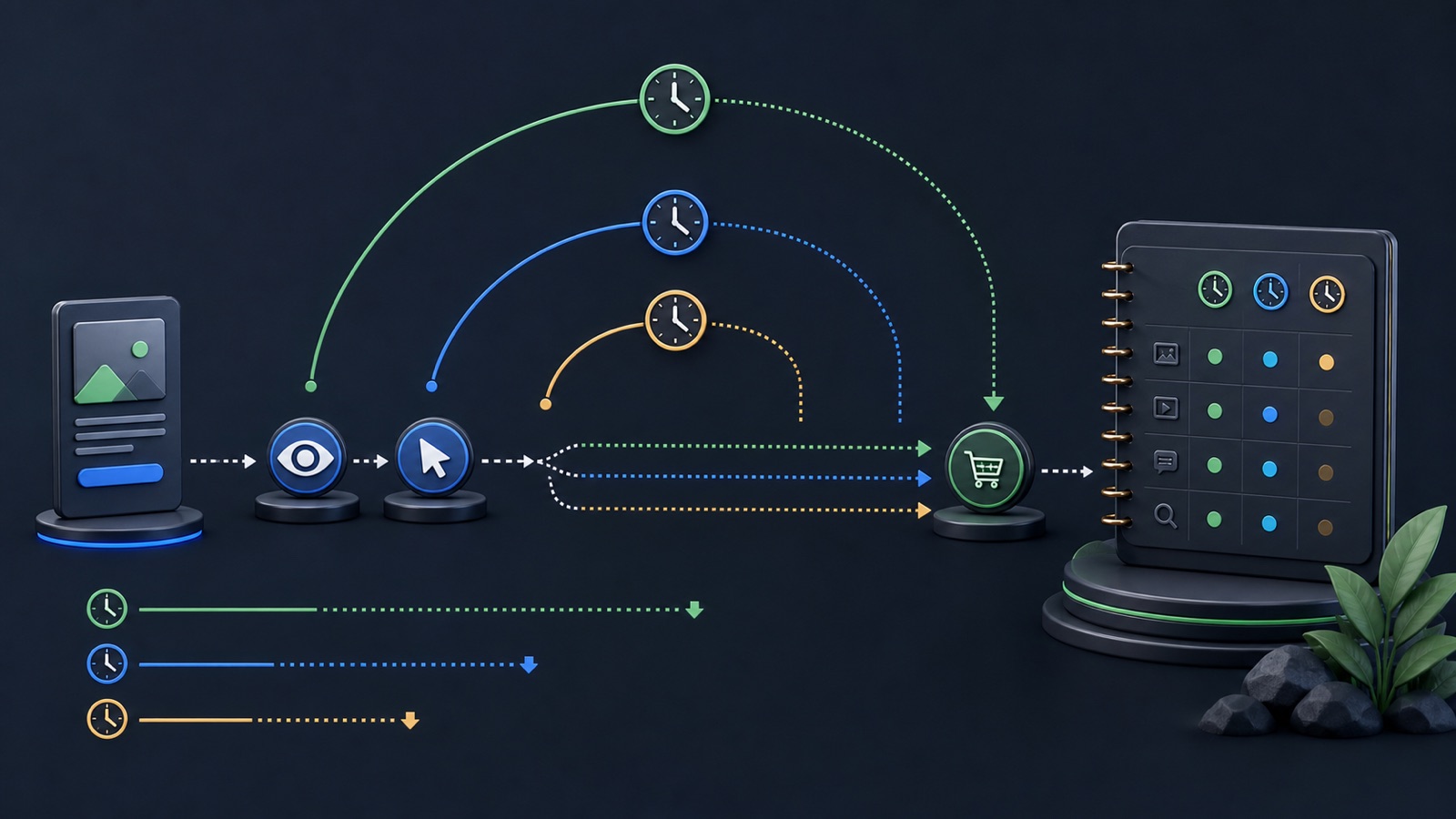
ILLUSTRATIVE WORKED EXAMPLE
Compare illustrative attribution views of the same campaign
PRACTICAL INTERFACE MAP
Move from the buying cycle to an attribution decision
Record typical discovery, consideration, conversion, sales follow-up, and fulfillment timestamps.
Capture the selected click and view windows, optimization event, reporting time zone, and effective date.
Compare Ads Manager credit with event logs, CRM stages, duplicate handling, and final customer status.
STEP-BY-STEP LESSON
Interaction → eligible window → credited event → business outcome
THE LEAD ATLAS METHOD
Lead Atlas Data can research a custom business-contact list for the campaign's exact market, locations, and categories, giving the team an outreach cohort measured independently from Meta attribution.See how custom list research works ↗Define the decision before the setting
State whether the analysis must guide delivery, compare creative, forecast follow-up capacity, or connect media to revenue. A conversion window appropriate for a quick call may not describe a considered purchase with several sales conversations. Write the event name, its business meaning, and when it becomes trustworthy.
Create a measurement brief with campaign, event, account time zone, buying-cycle notes, reporting owner, and the decision that will be made. Attribution should be consistent enough to support that decision, not expanded simply to make the result count larger.
Separate click and view credit
Click-through credit begins with an eligible ad click; view-through credit can apply after an eligible impression without a click. The two signals represent different levels of observable engagement. Confirm which options the current campaign type and account expose instead of assuming an old default still applies.
Report click and view credit separately when the interface permits. A person may encounter several channels before converting, so a credited view should be described as platform attribution—not as proof that the impression independently created the sale.
Match the window to the customer path
Use order timestamps, lead-response time, CRM stage history, and prior first-party data to understand elapsed time from meaningful interaction to conversion. Consider whether the configured event fires at form submission, qualified lead, appointment, purchase, or another point.
Draft a small lag table with same day, days one through seven, and later outcomes. Use it to justify the chosen window and note the conversions that will fall outside it. Keep the rule stable during a comparison unless the test explicitly studies attribution.
Protect event quality and deduplication
Browser, server, offline, and CRM events can overlap. Confirm event identifiers, source timestamps, currency and value fields, matching keys, consent handling, and deduplication before treating a window difference as customer behavior. A longer window cannot repair duplicate or delayed events.
Test a small set of known journeys from ad interaction through the business record. Record when each event fired, which source sent it, whether it was deduplicated, and how the final lead or sale was classified.
Reconcile without claiming causality
Compare attributed conversions, unique business records, qualified outcomes, closed revenue, refunds or cancellations, and unattributed paths. Explain differences using window rules, identity matching, time zones, event delay, cross-device behavior, and other marketing touches.
Deliverable: attribution brief, current settings capture, click-versus-view table, lag distribution, event-quality checklist, deduplication test, CRM reconciliation, change log, and a plain-language statement of what the report can and cannot prove.
THE TAKEAWAY
Choose an attribution setting before launch, document the business and data reasons, preserve comparison fields, and read platform credit alongside first-party sales evidence.OFFICIAL REFERENCES